
Abstract
The ES200 controller is a central component in modern automatic sliding door systems, renowned for its modular design and robust performance. This document provides a comprehensive analysis of the controller's architecture, operational principles, and common fault scenarios. It examines the intricate relationship between the controller and its peripheral components, including activation sensors, safety beams, and the motor drive system. The investigation focuses on five prevalent malfunctions: unresponsive door activation, failure to close or unexpected reopening, sluggish mechanical operation, power system failures, and configuration errors. A systematic, diagnostic methodology is presented for each fault, moving from preliminary visual checks to detailed parameter analysis. The objective is to equip facility managers and maintenance technicians with the theoretical understanding and practical skills necessary to accurately diagnose and resolve issues, thereby minimizing downtime and ensuring the long-term reliability and safety of the dorma es200 door systems. The analysis draws upon technical documentation and established best practices in electromechanical troubleshooting.
Key Takeaways
- Always begin troubleshooting with a thorough safety check and system de-energization.
- Distinguish between activation sensor faults (door won't open) and safety sensor faults (door won't close).
- Erratic movement often points to issues with safety beams, not the primary activation sensors.
- A systematic approach to diagnosing an ES200 controller fault is more effective than random part replacement.
- Sluggish door movement can be a mechanical issue or an incorrect motor parameter setting in the controller.
- Verify the integrity of the power supply and battery backup before condemning the main controller unit.
- A factory reset and careful re-commissioning can resolve many software and parameter-related errors.
Table of Contents
- Understanding the ES200 Controller: The Brain of Your Automatic Door
- Preliminary Diagnostics: Tools and Safety Protocols
- Fault 1: Unresponsive or Erratic Door Opening
- Fault 2: Door Fails to Close or Reopens Unexpectedly
- Fault 3: Sluggish Movement or Grinding Noises
- Fault 4: Complete Power Loss or Intermittent Operation
- Fault 5: Programming and Configuration Errors
- Advanced Troubleshooting and Component Replacement
- Frequently Asked Questions (FAQ)
- Final Considerations for Long-Term Reliability
Understanding the ES200 Controller: The Brain of Your Automatic Door
To approach the maintenance of an automatic door, one must first develop an appreciation for the intricate system of command and response that governs its every action. At the heart of this system, particularly in many high-performance sliding doors, lies the ES200 controller. It is not merely a switch but the central nervous system, processing a constant stream of information and issuing precise commands to create the seamless experience of a door opening as we approach and closing securely behind us. Thinking of it as the door's brain allows us to move beyond a purely mechanical view and into the realm of logic and control.
What is the ES200 Controller? A Foundational Overview
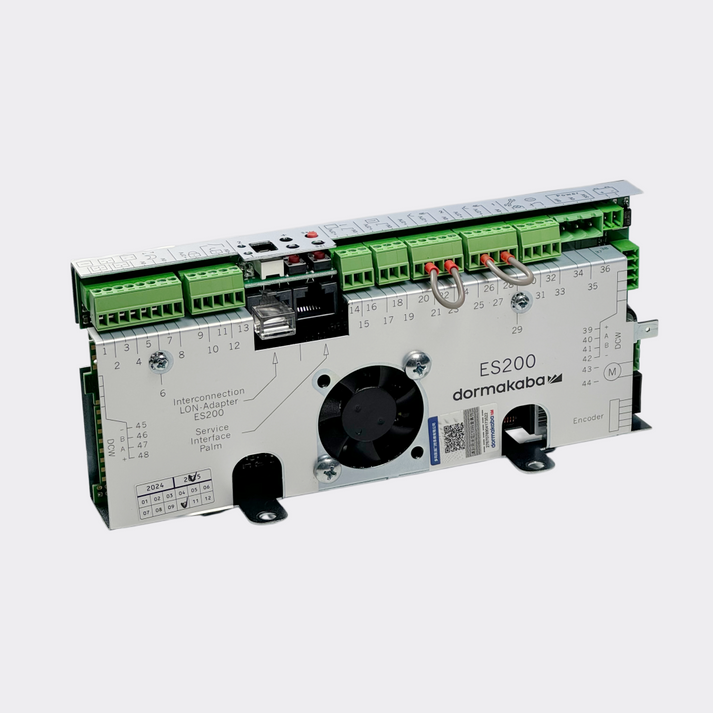
The ES200 is a microprocessor-based control unit designed specifically for automatic sliding door operators. Its primary function is to interpret input signals from various sensors, execute a set of programmed instructions, and manage the power delivered to the electric motor that drives the door panels. These input signals can come from a motion detector, a safety beam, or even a manual push-button. The controller's internal logic then determines the appropriate response: Should the door open? How fast? How long should it remain open? Is it safe to close? This decision-making process happens in fractions of a second, a silent and constant vigilance that ensures both convenience and safety. The unit itself is a compact electronic board housed within the main operator casing, featuring a series of terminal blocks for connecting all the system's electrical components.
The Modular Philosophy: Why the ES200 is Adaptable
A defining characteristic of the ES200 system, as highlighted in its technical specifications, is its modularity. This design philosophy is incredibly powerful. Imagine building with a set of standardized blocks; you can create a simple structure or a complex one using the same fundamental pieces. The ES200 operates on a similar principle. The core controller serves as the foundation, but its functionality can be expanded with additional modules. Do you need to integrate with a fire alarm system? There is a module for that. Do you require a special locking sequence for a high-security bank entrance? An expansion module can provide this capability. This modularity means that a basic ES200 operator for a small retail shop shares the same core DNA as a sophisticated, multi-functional system in a major airport. This standardization simplifies maintenance and parts inventory, as the fundamental components and troubleshooting principles remain consistent across a wide range of applications.
Key Components Governed by the Controller
The ES200 controller does not operate in isolation. It is the conductor of an orchestra of components, each playing a vital part.
- Activation Sensors: These are the "eyes" of the system, typically radar or infrared sensors that detect an approaching person and send the "open" signal to the controller.
- Motor: The "muscle" of the system. The controller delivers a precisely regulated voltage to the DC motor (often a high-quality Dunkermotoren unit) to control the door's speed, acceleration, and deceleration.
- Safety Sensors (Photocells/Beams): These project a beam of infrared light across the doorway. If this beam is broken by a person or object while the door is closing, the sensor immediately signals the controller to reverse direction, preventing impact.
- Carriage Assembly and Wheels: While mechanical, their movement is a direct result of the motor's action, which is governed by the controller. Wear on these parts can create resistance that the controller may interpret as an obstruction.
- Electromechanical Locks: For security, the controller manages the locking and unlocking of the door, ensuring it is secure when closed and free to move when activated.
- Program Switch: This allows a user to select different operating modes, such as "Automatic," "Exit Only," "Permanently Open," or "Night/Bank," which the controller then executes.
Understanding this ecosystem is fundamental. A fault is rarely isolated to the controller itself; more often, it is a problem with one of its inputs (sensors) or outputs (motor, lock), or the communication between them.
The Evolution from ESA II to Modern Iterations
To fully grasp the logic of the ES200, it is helpful to look at its predecessor, the ESA II controller. Technical manuals for the ESA II reveal a similar focus on safety, parameterization, and system integration. The ESA II laid the groundwork for many of the diagnostic features and operational parameters we see in the ES200. For instance, the use of error codes displayed on the unit, the concept of a commissioning routine, and the connection diagrams for safety beams and expansion modules are all concepts that have been refined and carried forward.
This evolutionary path demonstrates a commitment to a consistent operational philosophy. A technician familiar with the ESA II would find the ES200's layout and logic familiar, even with its enhanced capabilities. This lineage is important because it shows that the core principles of troubleshooting—checking inputs, outputs, and power—are timeless. The ESA II monitoring manual, for example, provides detailed block diagrams and electrical interface charts that are conceptually similar to those of the ES200, making these older documents valuable learning tools for understanding the fundamental architecture of these controllers.
Preliminary Diagnostics: Tools and Safety Protocols
Before any attempt is made to diagnose or repair an automatic door system, a disciplined approach centered on safety and methodical preparation is paramount. Rushing to a conclusion or disassembling components without a plan can introduce new faults or, more seriously, create a safety hazard. Think of this phase as a surgeon preparing their operating theater: every tool has its place, and every procedure begins with ensuring the patient's stability.
Essential Tools for Troubleshooting
While complex diagnostic tools exist, a majority of common ES200 controller faults can be identified with a basic set of instruments. Having these on hand prevents multiple trips and allows for a smooth, logical workflow.
- Multimeter: This is the most indispensable tool. It serves as your eyes and ears for the invisible world of electricity. It is used to measure AC/DC voltage, check for continuity (unbroken wires), and test resistance in components.
- Insulated Screwdrivers: A set of Philips and flat-head screwdrivers is necessary for opening covers and accessing terminal blocks. The insulation is a non-negotiable safety feature.
- Small Pliers and Wire Strippers: Useful for manipulating small wires or making repairs to damaged connections.
- Cleaning Supplies: A soft, lint-free cloth and a can of compressed air. Dust and debris are surprisingly common culprits in sensor-related faults.
- Manufacturer's Manual: If available, the specific manual for the door operator is the ultimate source of truth. It contains wiring diagrams, parameter lists, and model-specific information. The general principles in guides like this are widely applicable, but the manual is your definitive text.
Safety First: De-energizing and Securing the System
Working on an automatic door system without isolating it from power is profoundly dangerous. The system stores energy and can move unexpectedly, creating a risk of injury. The following procedure is not optional.
- Engage Manual Mode: If possible, use the program switch to put the door into "Off" or "Manual" mode.
- Locate the Circuit Breaker: The door operator will be powered by a dedicated circuit. Identify the correct breaker in the building's electrical panel and switch it to the OFF position.
- Lockout/Tagout: In a professional setting, apply a lock and tag to the breaker. This prevents someone from inadvertently restoring power while you are working.
- Verify Power is Off: Use your multimeter, set to measure AC voltage, to test the main power input terminals on the controller. The reading should be zero. Only then is it safe to proceed.
- Secure the Door: If you need to work on the drive mechanism, ensure the door panels cannot move freely. They can be heavy and may drift on the track.
Interpreting Basic Error Codes and Indicators
The ES200 controller often provides the first clue to a problem through its onboard LED indicators or a digital display on the program switch. These are not just decorative lights; they are a language. Learning to read them is the first step in diagnosis. While specific codes can vary slightly by firmware version, the general patterns are consistent. An error code might point directly to a specific component, such as "Safety Beam Fault," or indicate a more general problem like "Motor Obstruction." The ESA II commissioning manual provides an excellent example of how these error codes are structured, a practice continued in the ES200.
Table 1: Common ES200 Indicator Light Meanings
The following table outlines a general interpretation of common LED statuses. Always consult the specific product manual for the most accurate information.
| LED Indicator/Status | Possible Meaning | Recommended First Action |
|---|---|---|
| No Lights | No power to the controller. | Check circuit breaker and main power supply connections. |
| Solid Green Light | System is powered on and in a normal, standby state. | This is the expected state when the door is idle. |
| Flashing Green Light | System is in a special mode (e.g., learning cycle, manual). | Check the program switch setting. |
| Solid Red Light | A persistent, critical fault is active. | Identify the error code on the display, if available. |
| Flashing Red Light | A non-critical or intermittent fault has been detected. | Often relates to a safety device being temporarily active. |
| Amber/Orange Light | Often indicates a communication issue or battery status. | Check battery backup and connections to expansion modules. |
Fault 1: Unresponsive or Erratic Door Opening
Perhaps the most straightforward and common complaint regarding an automatic door is its failure to open upon approach. A person walks up to the door, expects it to open, and it remains stubbornly shut. This scenario almost always points to a problem within the activation system—the components responsible for telling the controller that someone wishes to enter or exit. The controller is waiting for a command that never arrives.
The Role of Activation Sensors
Activation sensors are the primary triggers for the door's opening cycle. The most common types are microwave (radar) sensors, which detect motion, and active infrared sensors, which detect the presence of a person or object in a defined area. When a sensor detects a valid target, it changes the state of its internal relay. This change in state sends an electrical signal—typically by closing a circuit—to a specific input terminal on the ES200 controller. Upon receiving this signal, the controller's programming instructs it to initiate the opening sequence: unlock the door (if locked), and power the motor to slide the panels open. If this initial signal is absent, corrupted, or ignored, the entire sequence fails to start.
Diagnosing Sensor Malfunctions: A Step-by-Step Guide
Troubleshooting an unresponsive sensor requires a methodical process of elimination. Let's walk through it as if we were standing in front of the door together.
Visual Inspection: Begin with the simplest checks. Is the sensor's lens clean? A layer of grime or a stray piece of tape can blind an infrared sensor. Is the sensor physically damaged or pointing in the wrong direction (e.g., aimed at the ceiling)? Is there a small LED on the sensor itself? Many sensors have an indicator light that illuminates when they detect motion. Wave your hand in the detection zone. Does this light turn on? If it does, the sensor is likely seeing you, which suggests the problem may be in the wiring or the controller. If it does not light up, the sensor itself may be faulty or lacking power.
Power Check: The sensor needs power to operate. After ensuring the main system is safely de-energized, open the operator cover. Locate the terminals on the ES200 controller that supply power to the activation sensor (often labeled with a voltage like 24V DC). Check the wiring for any obvious damage or loose connections. Once you have confirmed the connections are secure, you can (carefully, after re-energizing the system) use a multimeter to check the voltage at the sensor's power terminals. Are you getting the correct voltage specified in the manual? If not, the issue could be the controller's auxiliary power output or the wiring between them.
Signal Test: If the sensor has power and its indicator light activates, but the door still doesn't open, the next step is to test the signal wire. This is the wire that tells the controller to open. With the system powered off, you can perform a "jumper test." Disconnect the two activation signal wires from the controller terminal block. Then, take a short piece of wire (a "jumper") and briefly connect the two terminals together. If the door opens when you do this, you have effectively bypassed the sensor and sent the signal manually. This test proves that the controller's input and the rest of the door system are working correctly. The fault, therefore, lies with the sensor or its wiring.
Differentiating Between Sensor and Controller Issues
The jumper test described above is the most definitive way to differentiate between a sensor fault and a controller fault for this specific issue.
- If the jumper test works: The problem is upstream of the controller. It is either the sensor itself that is failing to send the signal (even if its LED lights up, its internal relay could be bad), or the wiring between the sensor and the controller is broken. You can use your multimeter's continuity setting to check for a break in the signal wire.
- If the jumper test fails: The problem is likely within the ES200 controller itself. It is receiving the signal (which you are simulating with the jumper) but is not acting on it. This could be due to an internal fault on the controller board, a conflicting setting in its programming (e.g., the door is set to "Off" mode), or a failure in the logic processing. At this point, you would re-check the program mode and look for any active error codes on the controller's display.
Solution: Sensor Recalibration and Replacement
If the fault is traced to the sensor, the solution depends on the specific type and problem. For some advanced sensors, a simple power cycle (turning the system off and on again) can force them to recalibrate. Many have small adjustment dials or buttons to change the sensitivity and shape of the detection field. Sometimes, an erratic door is simply caused by a sensitivity set too high, causing it to detect motion far away or even vibrations from the wall. Carefully adjusting this according to the manufacturer's instructions can resolve the issue.
If diagnostics confirm the sensor is faulty (e.g., no power, fails to detect, or fails to send a signal despite detecting), replacement is the only viable option. It is imperative to use a compatible replacement sensor that meets the same voltage and signal specifications as the original.
Fault 2: Door Fails to Close or Reopens Unexpectedly
A door that opens correctly but refuses to close, or one that starts to close only to immediately reverse and open again, presents a different and often more perplexing challenge. This behavior is not typically a sign of a faulty activation sensor. Instead, it almost universally points to an issue with the system's safety features. The controller is, in effect, doing its job perfectly: it believes there is an obstruction in the doorway and is correctly prioritizing safety by refusing to close. Our task is to understand why the controller thinks something is in the way.
The Critical Function of Safety Beams
The primary safety device in a sliding door system is the safety beam, also known as a photocell. This consists of two small components mounted on opposite sides of the door frame. One is a transmitter (sending a narrow, invisible infrared beam) and the other is a receiver. As long as the receiver "sees" the beam from the transmitter, it sends a continuous "all clear" signal to the ES200 controller. If a person, cart, or any object breaks this beam, the receiver instantly loses the signal and notify the controller of an obstruction.
If the door is already closing, the controller's immediate programmed response is to stop and reverse to the open position. If the door is open and the beam is broken, the controller will not allow the closing cycle to begin until the beam is clear again. Therefore, a door that will not close is often a door whose safety beam is constantly "broken," even when nothing is physically there.
Table 2: Comparison of Activation vs. Safety Sensors
To clarify this crucial distinction, consider the following comparison.
| Feature | Activation Sensor (e.g., Radar) | Safety Sensor (e.g., Photocell Beam) |
|---|---|---|
| Primary Purpose | To initiate the door's opening cycle. | To prevent the door from closing on a person or object. |
| Typical Location | Above the door, looking outwards and inwards. | Low on the door jambs, creating a line across the path. |
| Signal to Controller | Sends a momentary "Open" signal when triggered. | Sends a continuous "Clear" signal, which is interrupted to signal "Stop". |
| Common Fault Symptom | Door does not open. | Door does not close or reopens during closing. |
| Human Analogy | The "eyes" that see someone approaching. | The "hands" that feel for an obstruction in the path. |
Investigating Obstructions and Misalignments
The investigation should begin with the most common and easily fixed causes.
- Physical Obstruction: Look carefully. Is there anything physically blocking the beam? A misplaced sign, a piece of debris on the floor, or even a plant can be enough to trigger the sensor.
- Lens Contamination: The lenses on both the transmitter and receiver are small and susceptible to dirt, dust, and smudges. Wipe them clean with a soft, dry cloth. A film of grime can be enough to diffuse the beam and prevent the receiver from seeing it clearly.
- Misalignment: This is a very frequent culprit. The transmitter and receiver must be perfectly aligned with each other. Over time, vibrations or minor impacts can knock one of them out of alignment. Most units have a small indicator LED on the receiver that lights up when it has a solid connection with the transmitter. If this light is off or flickering, the units are likely misaligned. Gently try to adjust the position of one of the units until the indicator light becomes solid. This can be a sensitive adjustment.
Testing the Safety Beam Circuitry
If the simple checks do not resolve the issue, the next step is to investigate the electrical circuit.
- Check Wiring: As with the activation sensors, perform a visual inspection of the wiring running from the safety beams back to the controller. Look for pinches, frays, or loose connections at the terminal block.
- Power Verification: The beams require power from the controller. Check the voltage at the sensor terminals to ensure they are receiving the correct power.
- Bypassing the Safety Circuit (For Diagnostic Purposes Only): This is a critical diagnostic step, but it must be performed with extreme caution. A door with its safety features bypassed is a hazard. This test should only be done by a qualified technician to confirm a diagnosis, and the system must be restored to its safe state immediately afterward. The procedure involves placing a jumper wire across the safety input terminals on the ES200 controller. This mimics a constant "all clear" signal. If, after placing this jumper, the door closes normally, it definitively proves that the fault lies within the safety beam system (the sensors themselves, their alignment, or their wiring) and that the controller is functioning correctly. If the door still fails to close with the jumper in place, the problem is more complex and may reside within the controller's logic or another interconnected system.
Solution: Aligning, Cleaning, and Replacing Safety Sensors
Based on the diagnosis, the solution is usually straightforward. If the lenses were dirty, cleaning them solves the problem. If they were misaligned, careful readjustment to achieve a solid indicator light on the receiver is the fix. If wiring is damaged, it must be repaired or replaced. If the diagnostic tests (including the bypass test) point to a faulty sensor unit (e.g., it has power but will not produce a signal even when perfectly aligned), then the sensor pair must be replaced. Always replace safety sensors as a pair (transmitter and receiver) to ensure they are compatible and calibrated to work together.
Fault 3: Sluggish Movement or Grinding Noises
When an automatic door begins to move slowly, hesitates, or produces grinding and straining sounds, the issue transitions from the purely logical domain of sensors to the physical realm of the drive system. Here, the interplay between the controller's commands and the mechanical reality of moving heavy glass panels becomes critical. The controller might be sending the correct "move" signal, but the system is struggling to execute it. This can be due to a mechanical problem, a motor problem, or a parameter problem within the controller itself.
Motor and Drive System Integration
The ES200 controller manages the door's movement with remarkable finesse. It doesn't simply switch the motor on and off. It uses a technique called Pulse Width Modulation (PWM) to precisely regulate the power sent to the motor. This allows for controlled acceleration at the start of the opening cycle, a constant speed during travel, and smooth deceleration (braking) as the door approaches its end position. The controller constantly monitors the motor's operation, often by measuring the current it draws. A sudden spike in current might indicate an obstruction, prompting the controller to stop. This sophisticated control is what gives the door its smooth, quiet character. The motor, gearbox, belt, and carriage wheels are all part of this drive system, and a problem in any one of these components can manifest as sluggish or noisy operation.
Examining the Motor for Signs of Wear
The DC motor is the workhorse of the system. While high-quality motors like those from Dunkermotoren are built for longevity, they are not immune to wear after millions of cycles.
- Audible Clues: Listen closely to the motor as the door operates. A healthy motor has a consistent, low hum. Grinding, squealing, or clicking sounds often indicate worn bearings within the motor or the attached gearbox.
- Overheating: Carefully (as it can be hot) feel the motor housing after the door has been operating. While it's normal for it to be warm, excessive heat can be a sign that the motor is straining against high resistance, or that its internal windings are beginning to fail.
- Mechanical Resistance Check: With the system safely powered off, disengage the drive belt from the door carriage. Now, try to move the door panels by hand. Do they slide smoothly and easily? If you feel significant resistance, grinding, or catching, the problem is not the motor or controller but the mechanical elements: worn carriage wheels, debris in the track, or a misaligned door panel. This is a crucial step. The controller may be slowing the door down because it is detecting the high current draw caused by this mechanical resistance and interpreting it as an obstruction. Fixing the underlying mechanical issue will often resolve the sluggish movement.
Analyzing Controller Parameters for Motor Output
If the mechanical parts move freely and the motor seems audibly healthy, the issue may lie in the controller's settings. The ES200 controller has a vast array of adjustable parameters that dictate the motor's behavior. These are typically set during the initial installation and commissioning of the door. It's possible for these settings to be inadvertently changed or become inappropriate for the door's current condition.
Key parameters related to movement include:
- Opening/Closing Speed: This is a direct setting that controls the maximum travel speed. Has it been set too low?
- Acceleration/Deceleration (Ramp) Settings: These control how quickly the door speeds up and slows down. Incorrect settings can cause jerky or hesitant movement.
- Motor Power/Torque Limit: This setting determines the maximum force the motor will apply. If set too low, the door may lack the power to overcome normal friction, resulting in slow or stalled movement.
Accessing these parameters requires a specific procedure, often involving the program switch or a dedicated handheld programming tool. Changes should be made incrementally and with a clear understanding of what each parameter does, as incorrect settings can lead to unsafe or erratic door behavior.
Solution: Adjusting Motor Parameters and Addressing Mechanical Wear
The solution path follows directly from the diagnosis.
- If Mechanical Resistance is Found: The priority is to fix the mechanical issue. This may involve cleaning the floor track thoroughly, replacing worn-out carriage wheels, or adjusting the door hangers to ensure the panels are level and not scraping. Once the door moves freely by hand, the sluggishness will likely be gone.
- If Motor Wear is Suspected: If the motor itself is noisy, overheating, or failing, replacement is the only reliable solution. It is often best to replace the motor and gearbox as a single unit.
- If Parameters are Incorrect: If the mechanical system is sound, the next step is to carefully review the controller's motor parameters. This may involve performing a re-commissioning or "learn cycle." During this procedure, the controller moves the door back and forth, measuring the track length and the force required to move the panels. It then uses this data to automatically optimize many of its internal parameters. If a manual adjustment is needed, for example, to slightly increase the opening speed, it should be done in small steps, testing the door's operation after each change. Sometimes, a full factory reset of the controller, followed by a complete re-commissioning, is the most effective way to clear any corrupted settings and start fresh.
Fault 4: Complete Power Loss or Intermittent Operation
A door system that is completely dead—no lights on the controller, no response to any input—or one that randomly shuts down and restarts points to a fundamental problem: a lack of stable electrical power. While this might seem like a complex internal failure, the root cause is often found in the power supply chain, which is a logical path that can be traced step-by-step. The ES200 controller, like any computer, cannot function without a clean and constant source of electricity.
Tracing the Power Supply Chain
Think of electricity flowing like water through a series of pipes and valves. A blockage anywhere along the path will stop the flow.
- The Source (Building Power): The journey begins at the building's main electrical panel. Is the circuit breaker for the door operator in the 'ON' position? Breakers can sometimes trip due to a power surge or an electrical fault. If it has tripped, you can try resetting it once. If it immediately trips again, there is a short circuit somewhere in the system that must be found and fixed before proceeding.
- The Wiring to the Operator: From the breaker, a cable runs to the automatic door operator. Is this wiring intact? In some environments, this cable could be accidentally damaged. A visual inspection is the first step.
- The Main Input Terminals: Inside the operator housing, this cable connects to the main power input terminals of the ES200 system. Using a multimeter set to AC voltage, and with extreme caution, you should verify the presence of the correct mains voltage (e.g., 230V in Europe) at these terminals. If you have voltage here, the problem lies within the door operator itself. If you do not have voltage, the problem is upstream—in the building's wiring or at the circuit breaker.
The Function of the Internal Power Supply Unit (PSU)
If mains voltage is confirmed at the input terminals, the next component in the chain is the internal Power Supply Unit (PSU). The ES200 controller and its accessories (like sensors and electric locks) do not run on high-voltage AC power. They require low-voltage DC power (typically 24V). The PSU's job is to convert the high-voltage AC from the wall outlet into the clean, regulated low-voltage DC that the electronics need.
The PSU is often a distinct module within the ES200 system. A failure in this unit is a common cause of a "dead" controller. The PSU itself might have its own fuse that could have blown. If the PSU fails, it will not supply the 24V DC needed to power up the main controller board, sensors, and other components, resulting in a completely lifeless system.
Assessing Battery Backup Functionality
Many ES200 installations are equipped with a battery backup system. This is a crucial feature for safety and convenience, allowing the door to operate for a limited time during a power outage. The battery backup system is integrated with the PSU. During normal operation, the PSU keeps the battery charged. When mains power is lost, the system automatically switches over to draw power from the battery.
A failing battery can cause confusing, intermittent problems. An old battery may not be able to hold a proper charge. It might provide enough power to make the controller's lights flicker on briefly, but not enough to actually move the heavy door. In some cases, a shorted battery can even overload the charging circuit of the PSU, causing the entire system to shut down. To test this, you can (with all power off) safely disconnect the battery pack. Then, restore main power. If the door now operates normally off the main power, you have isolated the problem to a faulty battery pack, which needs to be replaced.
Solution: Verifying Power Input and Replacing the PSU or Battery
The diagnostic path leads directly to the solution.
- No Mains Power: If the issue is a tripped breaker or faulty building wiring, this must be addressed by a qualified electrician.
- Faulty PSU: If mains power is present at the input, but the controller remains dead (and the battery has been ruled out), the PSU is the most likely culprit. Testing the DC output of the PSU with a multimeter can confirm this. If it is not producing the specified DC voltage, the PSU module needs to be replaced. This is typically a modular component that can be unplugged and replaced with a new one.
- Faulty Battery: If the system works with the battery disconnected but fails or acts erratically with it connected, the battery pack is at the end of its life. It should be replaced with a new one of the exact same specification. Using the wrong type of battery can be a fire hazard or damage the charging circuit. A high-quality replacement for your ES200 controller often comes with a new, tested power supply unit, ensuring compatibility and reliability.
Fault 5: Programming and Configuration Errors
Sometimes, an automatic door's strange behavior is not caused by a broken wire or a worn-out part, but by a "misunderstanding" within its own brain. The ES200 controller is a highly configurable device, and an incorrect parameter setting can lead to a wide range of undesirable actions, from a door that closes too quickly to one that remains locked when it should be open. These are not hardware faults but software or logic problems.
The Nuances of Parameter Settings
The ES200 controller's memory holds dozens of parameters that define every aspect of its operation. Think of these as the "rules" the door must follow. These are set during the initial commissioning to match the specific requirements of the installation—the weight of the doors, the width of the opening, the expected foot traffic, and the required security level. For instance, a door at a hospital entrance will have a much longer "hold-open" time than one at a busy office. A heavy, insulated glass door will require a different motor power setting than a lightweight aluminum one. These settings are stored in non-volatile memory, meaning they are retained even when the power is turned off.
Common Misconfigurations: Speed, Hold-Open Time, and Mode
While there are many parameters, a few are more commonly associated with perceived faults.
- Opening and Closing Speed: If a door seems dangerously fast or frustratingly slow, it is often just a matter of adjusting these settings.
- Hold-Open Time: This parameter dictates how long the door remains fully open after a person has passed through. If this is set too short, the door may feel like it is "closing on people," even though the safety beams will still prevent an actual impact. If set too long, it can be inefficient, especially in climate-controlled environments.
- Operating Mode: The program switch (e.g., a key switch or digital panel) sets the door's overall mode. It is surprisingly common for a door to be reported as "broken" when it has simply been left in "Exit Only" or "Night/Bank" mode. In "Exit Only," the external activation sensor is disabled. Always check the selected mode first.
- Latching Action: This setting provides a final "push" of power just as the door closes to ensure it engages with the weather seals and lock correctly. If this is set incorrectly, the door might not close completely or may bounce slightly open.
How to Access and Modify Parameters
Accessing the parameter menu is a protected function to prevent unauthorized changes. The method varies but typically involves a specific sequence of button presses on the program switch or connecting a special programmer tool. For example, one might need to press and hold two buttons for several seconds to enter the programming menu. Once inside, the user can navigate through parameter numbers and change their values. This process is detailed in the manufacturer's technical manuals, like the ESA II manual which describes accessing parameters through its user interface. Given the potential to render a door inoperable or unsafe, this should only be done by a trained technician who understands the function of each parameter.
Solution: Performing a Factory Reset and Re-commissioning
If you suspect the parameters have been corrupted or incorrectly set and you are unsure of the original correct values, the most robust solution is often to return the controller to its original state.
A Factory Reset will wipe all custom settings and restore the controller's software to the state it was in when it left the factory. This is a powerful tool for eliminating any software-related glitches or configuration errors.
After a factory reset, the controller is a blank slate. It has no knowledge of the door it is connected to. Therefore, you must perform a Commissioning or "Learn" Cycle. This is an automated routine where the controller carefully opens and closes the door several times. During this process, it measures critical data:
- The full travel distance of the door panels.
- The weight of the doors (by measuring motor current).
- The friction in the system.
Using this data, the controller automatically calculates and sets many of the essential operating parameters to safe and efficient default values. After the learn cycle is complete, you can then make small, specific adjustments as needed, such as fine-tuning the hold-open time. This combination of a reset followed by a re-commissioning is the most reliable way to resolve complex programming faults and ensure the door is operating optimally for its specific installation.
Advanced Troubleshooting and Component Replacement
There comes a point in the life of any electronic device where simple fixes are no longer sufficient. When multiple subsystems are failing, when diagnostics yield inconsistent results, or when a core processing failure is evident, the focus shifts from repairing a peripheral component to addressing the controller itself. This is the stage where a decision must be made about replacing the central unit.
When to Consider a Full Controller Replacement
Replacing the ES200 controller is a significant step, and the decision should be based on a logical process of elimination. You should consider a full replacement under these circumstances:
- Failure of Multiple Outputs: If, for example, the controller is not sending power to the motor, the lock, and the sensor's power supply, it points to a catastrophic failure of the internal power regulation board or the main processor, rather than three separate, simultaneous faults.
- Confirmed Input Failure: You have used a jumper to simulate an activation signal, and the controller does not respond, proving the input terminal or its associated circuitry is dead.
- Inability to Enter Programming Mode or Retain Settings: If the controller will not accept a factory reset, fails to save parameter changes, or continuously displays garbled error codes that cannot be cleared, its microprocessor or memory is likely corrupted.
- Visible Physical Damage: Any signs of burning, charring, or corrosion on the circuit board itself are definitive indicators that the controller is beyond repair and must be replaced. Water damage is particularly destructive to these electronic components.
Sourcing High-Quality Replacement Parts
When a replacement is necessary, the quality of the new component is paramount. The market contains a wide variety of parts, but for a critical piece of infrastructure like an automatic door, compromising on quality is a false economy. A substandard part can fail prematurely, exhibit unpredictable behavior, or even lack the required safety certifications for use in public spaces in regions like Europe and the Middle East.
It is advisable to source components from a reputable supplier that specializes in automatic door parts. Look for suppliers who offer either genuine original brand parts or, alternatively, high-quality ES200 controller modules that have been tested for full compatibility and reliable performance. A good supplier can provide assurance that the component meets the necessary electrical and safety standards, ensuring a direct fit and dependable operation.
The Commissioning Process for a New ES200 Controller
Installing a new controller is more than just swapping the wires. A new controller is a blank slate and must be properly commissioned to learn the specific characteristics of the door it is now controlling.
- Safety First: Power down and lock out the system completely before beginning.
- Label Everything: Before disconnecting a single wire from the old controller, label it. Take a photo with your phone. This simple step can save you from a nightmare of trying to guess which wire goes where. The terminal blocks are marked, but your labels provide a second layer of certainty.
- Physical Swap: Carefully remove the old controller and mount the new one in its place.
- Reconnect Wiring: Transfer the wires one by one from the old, labeled controller to the corresponding terminals on the new unit. Double-check every connection.
- Initial Power-Up: Clear the doorway of all people and obstructions. Restore power to the system. The new controller should power on and may display an error code indicating that it has not yet been commissioned.
- Run the Learn Cycle: Initiate the commissioning routine as per the manufacturer's instructions. The door will begin to move slowly on its own, opening and closing to measure the track and set its base parameters. Do not interrupt this process.
- Test All Functions: Once the learn cycle is complete, the door should be in a basic operational state. Systematically test every function: the internal and external activation sensors, the safety beams, any manual push buttons, and all modes on the program switch.
- Fine-Tune Parameters: Make any final adjustments to parameters like hold-open time or opening speed to match the specific needs of the location.
This methodical process ensures that the new controller is not just installed, but fully integrated and optimized for safe, efficient, and long-lasting service.
Frequently Asked Questions (FAQ)
Why does my automatic door open and close for no reason (ghosting)? This is often caused by an activation sensor that is either too sensitive or is detecting something you might not expect. Radar sensors can sometimes detect vibrations from heavy traffic outside or even fluorescent lighting. Try slightly reducing the sensor's sensitivity or adjusting its detection area. Also, check for any reflective surfaces that might be confusing an infrared sensor.
Can I replace just one part of the safety beam system? It is strongly recommended to always replace safety photocells as a matched pair (transmitter and receiver). While it might seem possible to replace just the faulty half, new units may operate on slightly different frequencies or have different sensitivities than the old unit, leading to unreliable performance.
What does the "learn cycle" or "commissioning" actually do? The learn cycle is an automated setup routine where the controller teaches itself about the specific door it's attached to. It moves the door panels to measure the opening width, the weight of the doors (by monitoring motor current), and the friction of the track. It uses this data to automatically set optimal speeds, forces, and braking points for smooth and safe operation.
The door moves a few centimeters and then stops. What is the problem? This "inching" movement is a classic symptom of the controller detecting an obstruction or an unexpectedly high amount of force needed to move the door. The first thing to check is the mechanical movement. Power the system off and move the door by hand. If it feels heavy or grinds, the problem is in the wheels or track. If it moves freely, the issue could be a low motor power setting in the controller or a failing motor.
Is it possible to upgrade an older door operator with an ES200 controller? In many cases, yes. The modular nature of the ES200 system makes it adaptable. However, a retrofit requires careful consideration of compatibility, especially with the existing motor, power supply, and mounting points. The motor must be a compatible DC motor, and the controller must be housed properly. This type of upgrade should be undertaken by an experienced technician.
How often should an ES200-based automatic door be serviced? For most commercial applications, professional servicing is recommended at least once or twice a year. In high-traffic environments like hospitals or airports, quarterly checks may be more appropriate. Regular servicing includes cleaning and checking sensors, inspecting mechanical wear on wheels and tracks, testing safety features, and verifying controller parameters.
My door has a battery backup. How do I know if the battery is bad? A failing battery often manifests as intermittent or strange behavior, especially during minor power fluctuations. A definitive test is to turn off the main power to the door. If the door dies immediately instead of switching to battery power, the battery is likely dead. Alternatively, if the door works fine on main power but acts erratically when the battery is connected, the battery may have an internal short and should be replaced.
Final Considerations for Long-Term Reliability
The enduring performance of an automatic door system built around an ES200 controller is not a matter of chance. It is the direct result of a proper installation, a correct commissioning process, and a commitment to regular, informed maintenance. The controller, while remarkably intelligent and resilient, is part of a larger electromechanical ecosystem. Its health is inextricably linked to the health of the sensors that inform it, the motor that it commands, and the mechanical components that bear the physical load.
Viewing troubleshooting not as a frustrating battle against a machine but as a logical dialogue with it, changes the entire dynamic. The error codes, the indicator lights, and the very behavior of the door are all forms of communication. By learning to interpret this language—by understanding the difference between an activation fault and a safety fault, by recognizing the signs of mechanical resistance versus motor fatigue—a technician or facility manager becomes empowered. They move from reactive repair to proactive stewardship.
Ultimately, the reliability of the system hinges on a foundation of quality, both in the initial components and in any subsequent replacements. Ensuring that every part, from the smallest sensor to the main controller itself, meets rigorous standards is the best insurance against future failures and the surest path to maintaining the safety, convenience, and seamless operation that users expect.