

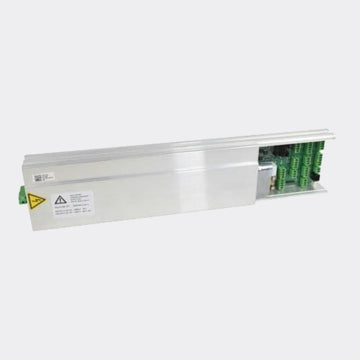
معالج جيزي Slimdrive SL NT
Key Specifications
-
Product name: GEZE Control Unit DCU 1 (DCU1-NT / DCU1-2M-NT) — electronic Geze control board for SlimDrive linear sliding door systems, including Slimdrive SL NT and related variants .
-
Role: Central controller for motor/encoder, sensors, program modes, diagnostics and the guided teaching/learn cycle .
-
-
Compatible operators: Slimdrive SL NT (70 mm low-profile header) and families in the Slimdrive SL/SLT/SC ecosystem; FR/escape versions use DCU1-2M-NT .
-
Commissioning tools: ST 220 Display Programme Switch (“Geze SL Control Panel”) and GEZEconnects for wireless setup/monitoring, where supported .
-
Program modes: Automatic, Permanent Open, Partial/Half Open, Exit-Only, Night/Bank .
-
Diagnostics: On-board fault memory and statistical data (cycle counts, service intervals); software-update capable .
-
Safety context: Designed for installations commissioned to EN 16005 / DIN 18650 when paired with compliant sensors, edges and (where required) FR hardware .
-
Power / interfaces (typical): AC input, 24 V peripherals output, battery input for emergency operation; bus interfaces for networking/integration as specified .
FAQ
Q1. Is DCU 1 the correct control for my Slimdrive SL NT?
A. Yes. DCU1-NT is the standard control for Slimdrive SL NT. Installations on escape and rescue routes typically require DCU1-2M-NT because of its redundant/FR logic. Match your header label and wiring diagram to choose the exact variant .
Q2. What does the “Geze SL Control Panel” do versus software tools?
A. The ST 220 panel gives a four-line menu for parameter changes, commissioning and diagnostics at the door. GEZEconnects adds wireless commissioning/monitoring and documentation workflows — helpful for multi-site portfolios .
Q3. Which operating modes can my staff select day-to-day?
A. Standard Slimdrive modes are Automatic, Permanent Open, Partial/Half Open, Exit-Only, and Night/Bank. Your building policy can lock or schedule these through the controller .
Q4. Does DCU 1 keep a history of errors and usage?
A. Yes. The controller stores fault codes and statistical data to support preventive maintenance and faster root-cause analysis .
Q5. We’re replacing a failed board — what is the minimum commissioning we must perform?
A. After wiring checks, run the teaching/learn programme: encoder test, opening width/close position, friction/force and leaf mass calibration. Then verify safety inputs and each program mode before handover .
Q6. Can the control integrate with building management?
A. Slimdrive platforms can be networked and linked to building automation through documented interfaces and accessories. Scope depends on installed modules and site requirements .
Q7. What are symptoms that point to a control-board issue rather than mechanics?
A. Recurrent, non-mechanical faults such as encoder loss without belt slip, intermittent sensor I/O errors across known-good devices, memory-persistent errors after mechanical service, or failure to complete the learn cycle often indicate DCU 1 or wiring concerns. Always verify supply voltages, earth/grounding and bus cabling before swapping modules .
Product Description
If your automatic entrance wears the Slimdrive badge, the GEZE Control Unit DCU 1 is the part that determines how the door feels to users — the smooth starts, accurate stops, quiet travel, and confidence that it will behave the same way tomorrow as it does today. As the central Geze control board for SlimDrive systems, DCU 1 coordinates motor torque and encoder feedback, interprets safety/activation sensors, provides the ST 220 user interface, and records diagnostic data to keep your doors dependable under real-world loads .
Why facility teams choose DCU 1
Consistent motion, fewer nuisance reversals.
Commissioning with DCU 1 sets acceleration/deceleration ramps, hold-open times, and target positions based on your door’s mass and friction. The benefit is predictable user experience and fewer callbacks for “door stops short” or “door reopens for no reason” — common symptoms when controls aren’t properly taught in .
Diagnostics that cut time-to-fix.
DCU 1’s fault memory and statistics give technicians hard data: cycle counts, last errors, and event sequences. That means service teams replace the right part the first time, reducing downtime and repeat visits .
Commissioning that fits your workflow.
With the Geze SL Control Panel (ST 220), techs can step through the guided teach sequence at the door; with GEZEconnects, they can wirelessly document parameters, export reports, and maintain version control across sites — a big win for compliance and portfolio consistency .
Slim profile, premium aesthetics.
The DCU 1 sits within the 70 mm Slimdrive header, allowing minimalist glass façades and retrofits into tight soffits. The low-wear drive and self-cleaning carriage concept keep acoustic signatures low — ideal for healthcare, hospitality, retail, and transit .
Choosing the right variant (reduce risk before ordering)
-
DCU1-NT — Standard Slimdrive SL NT control for non-escape applications.
-
DCU1-2M-NT — For escape and rescue routes (FR). Provides redundant logic and wiring provisions required under regional codes.
-
Tip: Photograph the nameplate and the current controller inside the header to confirm the exact variant and firmware family before ordering .
What professionals want to know — and our straight answers
-
Will it work with my existing sensors and locks?
Yes, Slimdrive controllers support documented safety edges, presence/light-barrier sensors, and GEZE lock accessories. Verify your wiring plan and any third-party devices during commissioning (GEZE, 2019). -
Can I continue to use my program switch?
Yes. Existing ST 220 switches remain the primary Geze SL Control Panel for day-to-day mode selection and parameter access . -
How does it impact compliance?
The control provides the logic to meet EN 16005 / DIN 18650 when commissioned with compliant sensors and edges. Your installer must verify forces, sensor fields, and emergency functions during handover . -
What if power fails?
With the approved battery module connected, the system performs the configured fail-safe cycle (open/close) to preserve egress and security, then signals the condition for service .
Field-tested upgrade path (for higher conversion and fewer callbacks)
-
Pre-check & documentation — Capture nameplates, controller photos, and wiring to confirm DCU 1 variant and options.
-
Swap & wiring verification — Replace the Geze control board, check fuses and earthing, verify peripheral voltages and bus connections.
-
Teach-in — Run the full teaching programme: encoder check, opening width/close position, friction/force and mass calibration.
-
Safety proof — Confirm sensor logic, safety edges, and emergency battery behaviour; test all user modes (Automatic, Permanent Open, Partial/Half Open, Exit-Only, Night/Bank).
-
Document — Store parameters with GEZEconnects and schedule preventive maintenance based on the statistics memory .
What’s included / options
-
Included: Control Unit Geze SlimDrive — DCU 1 board (variant as ordered).
-
Common add-ons: ST 220 program switch (if not already fitted), approved battery pack, sensor/edge upgrades, and networking accessories as required by your specification.